


 By
By Residential vs Datacenter vs Mobile Proxies (2026): Which Type Do You Need?
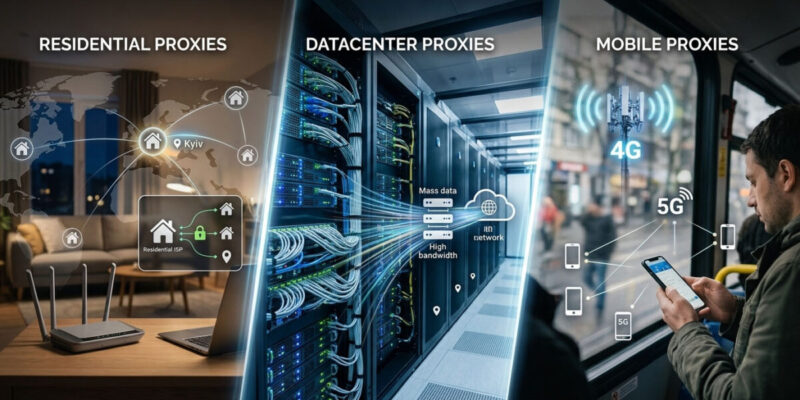
Not all proxies are the same, and picking the wrong type is how you either overpay or get every account banned. The three main kinds — residential, datacenter, and mobile (plus a fourth worth knowing, ISP) — differ in where the IP comes from, how easily sites detect it, how fast it is, and what it costs. This guide explains each in plain English and maps them to the use case that matters here: multi-accounting and media buying.
(New to proxies? See our Proxies for Multi-Accounting guide; ready to buy, see our best residential proxies comparison.)
The quick answer
| Type | IP source | Detection risk | Speed | Cost | Best for |
|---|---|---|---|---|---|
| Datacenter | Servers / cloud | High (easily flagged) | Fastest | Cheapest (~$0.50–1.50/IP) | Non-sensitive tasks, cheap scraping |
| Residential | Real home devices | Low | Medium | $1–8/GB | Multi-accounting default, most scraping |
| Mobile | 4G/5G carrier IPs | Lowest (most trusted) | Medium | Highest (~$2+/GB or $80+/mo) | Toughest platforms, account farming |
| ISP (static residential) | Datacenter-hosted, ISP-registered | Low | Fast | Per-IP | Stable, residential-looking account IPs |
Short version for multi-accounting: residential is the default, mobile for the hardest platforms and farming, datacenter only where detection doesn’t matter, and ISP when you need a stable residential-looking IP that doesn’t rotate.
Datacenter proxies
What they are: IPs that come from servers in data centers (cloud providers, hosting companies) — not tied to any real household or carrier.
Pros: the cheapest and fastest option, often sold per-IP with unlimited bandwidth. Great when you need raw speed and volume.
Cons: the easiest to detect and block. Their IP ranges are publicly known to belong to hosting providers, so any site with decent anti-fraud (and virtually all major platforms) can flag them instantly. Shared datacenter IPs also carry “bad neighbor” risk — other users’ abuse gets the IP banned.
Use for: non-sensitive scraping of sites that don’t fight back, internal tools, price checks, and anywhere detection genuinely doesn’t matter. Avoid for running accounts on Meta, Google, TikTok, Amazon, or any platform that bans aggressively.
Residential proxies
What they are: IPs assigned by ISPs to real home devices, routed through consenting users’ connections. To a website, the traffic looks like a normal person browsing from home.
Pros: hard to detect because the IPs are genuine residential addresses, with huge pools spanning most countries and city-level targeting. This is the sweet spot of legitimacy and cost — the reason residential became the baseline for serious multi-accounting, ad verification, and scraping in 2026.
Cons: more expensive than datacenter ($1–8/GB), usually metered by bandwidth rather than per-IP, and medium speed. Pool quality varies — a big pool full of already-flagged IPs is worse than a smaller, filtered one.
Use for: the default choice for multi-accounting and most account work, plus scraping protected targets. Pair with an antidetect browser, one proxy per profile. Providers like IPRoyal (value) and NodeMaven (cleanest pool) lead here.
Mobile proxies
What they are: IPs from mobile carriers (4G/5G), assigned to real phones on cellular networks.
Pros: the most trusted IP type of all. Because carriers share a small pool of IPs among many real users (via CGNAT), platforms can’t ban a mobile IP without risking banning thousands of legitimate users — so they treat mobile traffic as highly trustworthy. This makes mobile the strongest choice for the hardest platforms and account farming, where residential still gets friction.
Cons: the most expensive type (premium per-GB or monthly-per-port pricing, often $80+/month for a dedicated mobile IP), and speed/consistency can vary with the cellular connection.
Use for: account farming and the toughest social platforms (the ones that flag even residential), and any account you really can’t afford to lose. Overkill and pricey for ordinary tasks.
ISP proxies (the fourth type)
What they are: a hybrid — datacenter-hosted servers with IPs registered to real ISPs. They combine residential legitimacy (the IP looks like a home connection) with datacenter speed and stability, and they’re static (they don’t rotate).
Pros: fast and stable like datacenter, but residential-looking to websites, and they hold the same IP indefinitely — ideal when an account needs a consistent, trustworthy IP rather than a rotating one.
Cons: priced per-IP (not the cheapest), and pools are smaller than rotating residential.
Use for: accounts that need a stable, residential-looking IP — a long-lived social or ad account you always log into from “the same place.” IPRoyal, NodeMaven, and Decodo all offer ISP proxies.
How to choose for multi-accounting
- Everyday account work (default): residential — the best balance of trust and cost.
- Toughest platforms / account farming: mobile — highest trust, worth the premium for accounts you can’t lose.
- A stable IP for a long-lived account: ISP (static residential) — consistent and trustworthy.
- Cheap, non-sensitive tasks: datacenter — only where detection doesn’t matter.
Two rules regardless of type: one proxy per profile (never share an IP across accounts you want kept separate), and the proxy is only half the job — pair it with a quality antidetect browser so the IP and fingerprint match. A US residential IP behind a mismatched fingerprint (or timezone) still gets flagged.
FAQ
What’s the difference between residential and datacenter proxies? Residential IPs come from real home devices and are hard to detect; datacenter IPs come from servers and are cheap and fast but easily flagged. For running accounts, use residential; datacenter only for non-sensitive tasks.
Are mobile proxies better than residential? For trust, yes — mobile carrier IPs are the hardest to block because many real users share them, making them best for the toughest platforms and farming. But they’re more expensive, so residential is the cost-effective default for most work.
Which proxy type is best for multi-accounting? Residential for everyday account work, mobile for the hardest platforms and farming, ISP (static residential) for accounts needing a stable IP, and datacenter only where detection doesn’t matter.
What are ISP proxies? Static proxies that are datacenter-hosted but registered to real ISPs — combining residential legitimacy with datacenter speed and a fixed, non-rotating IP. Good for long-lived accounts.
How much do the different proxy types cost? Datacenter is cheapest (~$0.50–1.50/IP), residential is $1–8/GB, ISP is priced per IP, and mobile is the most expensive (premium per-GB or $80+/month per dedicated IP).
Do I still need an antidetect browser with residential proxies? Yes. The proxy handles the IP; the antidetect browser handles the fingerprint and profile isolation. You need both, matched to each other.
Bottom line
For multi-accounting, residential proxies are the default, mobile is the premium upgrade for the toughest platforms and farming, ISP gives you a stable residential-looking IP for long-lived accounts, and datacenter is only for cheap, non-sensitive work. Match the type to the job, use one proxy per profile, and always pair proxies with a quality antidetect browser. When you’re ready to buy, our best residential proxies comparison covers the providers worth using.
Written for WarmRig — tested tools and infrastructure for traffic arbitrage and performance marketing. Independent, not sponsored.















[…] […]