


 By
By AdsPower Review 2026: The Value Pick for Teams
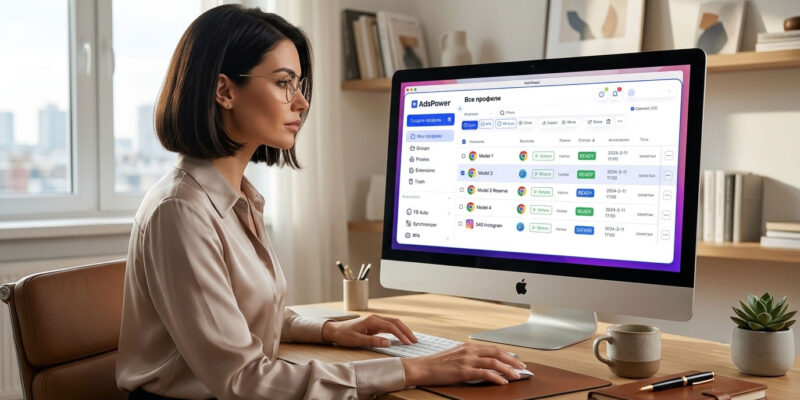
With more than 9 million users, AdsPower is the workhorse of the value tier — the antidetect browser most agencies and e-commerce operators reach for when team coordination matters as much as fingerprint quality, and the budget isn’t Multilogin-sized. This review covers what it actually does, what it really costs in 2026 (including the pricing gotcha that catches teams), and where it fits versus the media-buyer-focused Dolphin{anty}.
(New to the category? Start with what an antidetect browser is, or see the whole field in our best antidetect browsers guide.)
Quick verdict
AdsPower is the best all-rounder for value: strong team features, no-code automation built in rather than paywalled, two browser engines, and a free-forever tier to test on. Its fingerprints are good — not quite Multilogin-tier — which is a fair trade at the price. The one thing to watch is per-seat team pricing, which quietly adds up. For agencies, e-commerce, and mixed ad-ops workflows, it’s the value default.
| Type | Antidetect browser (Chromium SunBrowser + Firefox-based FlowerBrowser) |
| Best for | Agencies, e-commerce, ad ops — team workflows |
| Users | 9M+ |
| Free tier | 2 profiles (forever, no card) |
| Paid from | $9/mo (Professional, 10 profiles) — $5.40/mo annual |
| Automation | No-code RPA, multi-window synchronizer, bulk import (1,000 profiles), local API |
| The catch | Team seats ~$5/seat/month on top of the plan |
What AdsPower is
AdsPower is an antidetect browser designed around managing many accounts as a team. It runs isolated profiles with unique fingerprints across two engines — a Chromium-based browser (SunBrowser) and a Firefox-based one (FlowerBrowser) — which gives you fingerprint variety most tools don’t. It exposes 50+ fingerprint parameters, supports native mobile simulation (including iOS user-agent and device name), and adds network-level controls like disabling UDP for WebRTC and toggling TLS handshake behavior to reduce leaks.
Where it really separates from the pack is scale and teamwork: you can import up to 1,000 profiles at once, drive a multi-window synchronizer, run no-code RPA automation (built in, not an upsell), and share profiles across a team with role-based permissions.
Who it’s for
- Agencies managing many clients’ ad and social accounts, where roles, sharing, and coordination matter.
- E-commerce sellers running multiple marketplace or storefront accounts (Amazon, eBay, Etsy) across regions.
- Ad-ops teams that want strong proxy management and automation without paying enterprise prices.
- Anyone who wants automation without coding — the RPA and synchronizer cover bulk operations out of the box.
It’s a broader, more team-oriented fit than Dolphin{anty}, which is narrowly optimized for the solo media-buyer FB/TikTok workflow.
Fingerprinting and stealth
AdsPower’s fingerprints are good and, with 50+ adjustable parameters plus the WebRTC/TLS controls, flexible. In independent testing it generally passes the common detection checks. The honest framing: for high-value accounts where a single ban is catastrophic, Multilogin and Octo edge it on raw fingerprint quality — but for the value tier, AdsPower is among the strongest, and the two engines (Chromium + Firefox) add variety that helps at scale.
Same category caveat applies: for mobile-first platforms (TikTok app, Instagram Reels), a browser emulating a phone is weaker than a real cloud phone. AdsPower’s mobile simulation helps for the ad-account side, not for heavy in-app mobile activity.
Automation and team features
This is AdsPower’s core strength:
- No-code RPA — build automation workflows without scripting; bulk create, edit, and delete profiles.
- Multi-window synchronizer — control many profiles at once for manual operations.
- Bulk import — up to 1,000 profiles in one go.
- Local API — 120 requests/minute on Professional, 300 on higher tiers, for custom automation (Selenium/Puppeteer style).
- Team roles and sharing — transfer and share profiles with permission controls, which scales cleanly from solo to large teams.
Pricing (verified late July 2026)
| Plan | Price | Profiles | Notes |
|---|---|---|---|
| Free | $0 forever | 2 | 1 super-admin, no team members, no card |
| Professional | from $9/mo ($5.40 annual) | 10 / 20 / 50 / 100 | +2 free profiles; local API 120 rpm; 7-day trial |
| Business | ~$48–61/mo | 200 | Most popular; local API 300 rpm |
| Enterprise | custom | 5,000+ | Contact sales |
The headline value is real: 2 free profiles forever, and paid from $9/mo (or $5.40 on annual) for 10 profiles — around $0.30–0.36 per profile on mid-tiers, among the cheapest capable options. Annual billing saves 20%, quarterly 10%.
The gotcha: team seats are charged separately at roughly $5 per seat per month on top of your plan. For a solo operator it’s irrelevant; for a 10-person team it’s a real line item, so price it in. A solo user on 50 profiles with a couple of seats lands around $30–38/month — still competitive.
Pros and cons
Pros
- Excellent value; 2 free profiles forever
- Best-in-tier team features and no-code automation (built in)
- Two engines (Chromium + Firefox) for fingerprint variety
- Scales cleanly to 1,000+ profiles; strong proxy management (HTTP/SOCKS5/SSH, IPv6)
- 9M+ users — mature, well-supported, frequently updated
Cons
- Per-seat team pricing adds up
- Fingerprints good but not Multilogin/Octo-tier for the highest-value accounts
- Only 2 profiles on the free plan (Incogniton gives 10)
- Dense, feature-heavy UI can overwhelm new users
- Same mobile-first limitation as all browser-based tools
Security and trust
AdsPower is a mature platform with a very large user base and no headline breach history of the kind that hit some rivals. As with any antidetect tool, protect your account with an authenticator app, and don’t warehouse irreplaceable secrets (seed phrases, 2FA backups) inside a profile — that’s basic hygiene, not an AdsPower-specific concern.
How AdsPower compares
- vs Dolphin{anty}: AdsPower is the broader, team-friendly all-rounder (agencies, e-commerce, mixed ad ops) with deeper automation and team tooling; Dolphin is cheaper at solo entry and laser-focused on the FB/TikTok media-buyer workflow. Solo affiliate → Dolphin; team or mixed operation → AdsPower. (See our full Dolphin{anty} review.)
- vs Multilogin / Octo: those win on raw fingerprint quality for high-value accounts, at a much higher price. AdsPower wins on value, team features, and built-in automation.
- For the full field, see our best antidetect browsers in 2026 comparison.
FAQ
Is AdsPower free? Yes — a free-forever plan with 2 browser profiles and no credit card. It’s a real plan, not a trial, though limited to 2 profiles and no team members.
How much does AdsPower cost? Paid plans start at $9/month (or $5.40 on annual billing) for 10 profiles, scaling to 200+ on Business. Team seats cost roughly $5 each per month on top of the plan.
Is AdsPower safe to use? Yes, for ordinary multi-account work. It’s a mature tool with 9M+ users; enable 2FA and keep irreplaceable secrets out of your profiles as standard practice.
Is AdsPower better than Dolphin{anty}? For teams, e-commerce, and mixed workflows, AdsPower’s team and automation features make it the stronger all-rounder. For a solo media buyer on Facebook/TikTok, Dolphin’s focus and lower entry price often fit better.
Does AdsPower work for Facebook ads? Yes — it handles multi-account ad workflows well, with strong proxy management and automation. For TikTok’s mobile-app side specifically, cloud phones are stronger than any browser tool.
Do I need proxies with AdsPower? Yes. AdsPower manages the fingerprint; you assign a proxy per profile for the IP. See our proxies guide.
Bottom line
AdsPower is the value default for a reason: strong team features, genuinely useful no-code automation, two engines, and a free tier to test on — at a price well below the premium tools. Its fingerprints won’t quite match Multilogin’s for the highest-stakes accounts, and the per-seat pricing needs watching, but for agencies, e-commerce, and mixed ad operations it’s hard to beat on value. If you’re a solo media buyer focused on Facebook and TikTok, compare it against Dolphin{anty} first; for the whole landscape, see our best antidetect browsers guide.
Written for WarmRig — tested tools and infrastructure for traffic arbitrage and performance marketing. Independent, not sponsored.
Product Review
Thank you
Your Review is appreciated















[…] […]