


 By
By GoLogin Review 2026: The Best Budget Antidetect Browser?
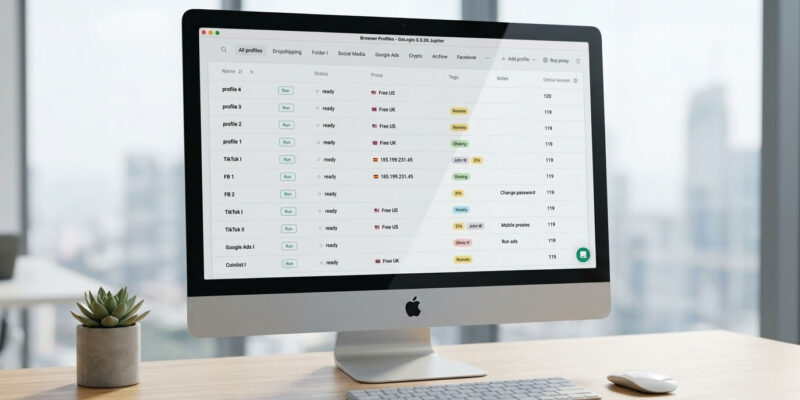
If you’re new to multi-accounting and don’t want to gamble a big subscription on a tool you haven’t tested, GoLogin is the name that comes up most — cheap, stable, and with a genuinely free tier. But “cheapest” and “best to start with” aren’t always the same thing. This 2026 review covers what GoLogin actually delivers, its updated pricing (now with built-in proxies), where its fingerprints stand, and who it’s right for.
(New to the category? Start with what an antidetect browser is, or compare the field in our best antidetect browsers guide.)
Quick verdict
GoLogin is the best place to start: a real free tier, the cheapest capable paid entry, built-in residential proxies on every paid plan, and a stable, easy interface. Its fingerprints are good rather than best-in-class, which is the honest trade for the price — fine for most multi-accounting, less so for the highest-stakes accounts. For beginners, solo operators, and cost-conscious teams, it’s the value pick; for accounts where one ban is catastrophic, step up to Multilogin.
| Type | Chromium-based antidetect browser (Orbita) |
| Best for | Beginners, solo operators, cost-conscious teams |
| Free tier | Forever free: 3 profiles |
| Paid from | $24/mo (annual, Professional) / $49 monthly |
| Bonus | 2GB residential proxies bundled in every paid plan |
| The catch | Fingerprints aren’t Multilogin-tier; steep jump to team (Business) tier |
What GoLogin is
GoLogin is a Chromium-based antidetect browser built on its own Orbita engine. It runs isolated profiles, each with a unique fingerprint across 50+ parameters — user agent, canvas, WebGL, fonts, timezone, hardware — so each profile looks like a separate device. It runs on Windows, macOS, and Linux, supports cloud launches (run a profile without installing anything locally), and integrates with Puppeteer for automation.
The 2026 pricing update added a genuinely useful perk: every paid plan now bundles 2GB of residential proxy traffic, usable directly from GoLogin without a third-party provider — handy for getting started before you invest in dedicated proxies.
Fingerprint quality
GoLogin’s fingerprints are solid and pass the common detection checks for everyday multi-accounting. The honest caveat, echoed in independent testing, is that at the budget end there can be less fingerprint uniqueness across many profiles than the premium tools deliver — something to weigh if you’re running large volumes of sensitive accounts. For typical use it’s fine; for high-value accounts at scale, Multilogin’s fingerprints are worth the premium.
Pricing (verified 2026)
GoLogin set new pricing for accounts registered from January 2026. Annual billing saves 50% over monthly, all paid plans include a 7-day trial and 2GB of built-in residential proxies.
| Plan | Price (annual) | Profiles | Team seats |
|---|---|---|---|
| Free | $0 | 3 | — |
| Professional | from $24/mo ($49 monthly) | 10 / 50 / 100 | 0 (solo, profile sharing only) |
| Business | ~$99/mo | 300 / 500 | Team seats included |
| Enterprise | ~$199/mo | 1,000 | Unlimited seats |
| Custom | up to ~$449/mo | 2,000–100,000 | Custom |
The value story is real at both ends: a forever-free 3-profile plan to learn on, and a $24/mo entry that’s among the cheapest capable subscriptions anywhere. And unusually, GoLogin’s team tiers are cost-effective — Business bundles team seats rather than charging per-seat add-ons, which makes it noticeably cheaper than some rivals once a team is involved.
The one caveat mirrors the category: the jump from solo Professional to Business is steep, justified by team seats and a big profile increase.
Pros and cons
Pros
- Real forever-free tier (3 profiles) to test on
- Cheapest capable paid entry ($24/mo annual)
- 2GB residential proxies bundled in every paid plan
- Team tiers include seats (cheaper for teams than per-seat rivals)
- Stable, beginner-friendly; cross-OS; cloud launches; Puppeteer support
Cons
- Fingerprints good but not Multilogin/Octo-tier for the highest-stakes accounts
- Less fingerprint uniqueness across many profiles at scale
- Free plan won’t restore deleted profiles
- Steep solo → Business price jump
- Same mobile-first limitation as all browser-based tools
Security and trust
GoLogin is an established tool with a large user base and no headline breach history of the kind that hit some competitors. Standard hygiene applies: use an authenticator app and don’t store irreplaceable secrets in a single profile.
How GoLogin compares
- vs Multilogin: Multilogin has better fingerprints and now bundles real cloud phones — worth it for high-value and mobile-first work. GoLogin wins decisively on price to start and on team-tier value. Stakes-first → Multilogin; cost-first → GoLogin. (See our Multilogin review.)
- vs AdsPower: Close call at the value tier. AdsPower has deeper no-code automation and two engines; GoLogin is cheaper to start and simpler, with bundled proxies. Automation-heavy → AdsPower; simplest cheap start → GoLogin. (See our AdsPower review.)
- For the full field, see our best antidetect browsers in 2026 comparison.
FAQ
Is GoLogin free? Yes — a forever-free plan with 3 browser profiles, no credit card. It’s enough to learn the workflow, though it won’t let you restore a deleted profile.
How much does GoLogin cost? Paid plans start at $24/month (annual) or $49 monthly for the Professional tier (10–100 profiles), rising to Business (~$99/mo, 300–500 profiles with team seats) and Enterprise (~$199/mo, 1,000 profiles). Annual billing saves 50%.
Is GoLogin safe? Yes for ordinary multi-accounting — it’s a mature tool with no major breach history. Enable 2FA and keep irreplaceable secrets out of your profiles as standard practice.
Is GoLogin good for beginners? It’s arguably the best beginner pick: cheap, stable, easy to use, with a real free tier and bundled proxies so you can start without sourcing IPs separately.
Is GoLogin better than Multilogin? For price and ease of starting, yes. For raw fingerprint quality and mobile-first cloud phones on high-value accounts, Multilogin is better. Match the tool to the stakes.
Do I need proxies with GoLogin? Every paid plan includes 2GB of residential proxies to start, so not immediately. For serious volume you’ll still want dedicated proxies — see our proxies guide.
Bottom line
GoLogin is the value champion and the best place for most people to begin: a real free tier, the cheapest capable paid plan, bundled residential proxies, and a stable, friendly interface. Its fingerprints are good rather than elite, so as your accounts get more valuable you may outgrow it — but as a first antidetect browser, or a cost-effective option for a small team, it’s hard to beat. When the stakes rise, compare Multilogin; if you want deeper automation at a similar price, compare AdsPower. For the whole landscape, see our best antidetect browsers guide.
Written for WarmRig — tested tools and infrastructure for traffic arbitrage and performance marketing. Independent, not sponsored.
Product Review
Thank you
Your Review is appreciated

















[…] Best price-to-entry / for beginners: GoLogin […]