

 By
By Incogniton Review 2026: The Friendliest On-Ramp to Multi-Accounting?
Incogniton has a reputation as the easiest antidetect browser to start with — a gentle learning curve, a generous free plan, and solid automation for developers. In 2026, part of that reputation needs an update: the famously generous free tier has changed. This review covers what Incogniton actually delivers, its real pricing (including the free-plan catch and a VAT gotcha for EU buyers), where its fingerprints stand, and who it’s right for.
(New to the category? Start with what an antidetect browser is, or see the whole field in our best antidetect browsers guide.)
Quick verdict
Incogniton is the friendliest on-ramp for beginners and the easiest to automate for developers — a non-technical user can be running their first profile in about 10 minutes, and its Selenium/Puppeteer/REST API support (from the Entrepreneur tier) is well-documented. Two things to know: the free plan is now 10 profiles for 2 months, then 3 (not 10 forever), and EU buyers pay +20% VAT on top of listed prices. Fingerprints are competent — not class-leading like Octo, not budget-tier. A solid pick for learning and light-to-mid use; not the top choice for the highest-stakes accounts.
| Type | Chromium-based antidetect browser |
| Best for | Beginners, developers/scrapers, solo operators |
| Free tier | 10 profiles for 2 months → 3 profiles after |
| Paid from | $19.99/mo (Starter Plus, 10 profiles) |
| Standout | Gentle learning curve; strong automation; “Paste as Human Typing” |
| The catch | Free tier now time-limited; +20% VAT for EU; no money-back guarantee |
What Incogniton is
Incogniton is a Chromium-based antidetect browser for creating and managing many isolated browser profiles — each with its own cookies, storage, cache, and fingerprint — so accounts stay separate. Its calling card is approachability: a clean, guided interface that gets non-technical users up and running fast, which is why it’s so often recommended as a first tool.
It also punches above its weight on automation: full Selenium, Puppeteer, and REST API support, bulk profile creation via CSV, a Synchronizer to mirror actions across profiles, and a clever “Paste as Human Typing” feature that simulates real typing speed to avoid the bot-detection triggers that instant paste can set off.
The free plan: read this first
Incogniton’s free tier used to be the most generous in the category — 10 profiles, forever. That changed. As of 2026, the free “Starter” package gives you 10 profiles for the first 2 months, then automatically drops to 3 profiles. To keep 10 or more beyond the trial, you move to a paid plan.
It’s still a genuinely useful way to learn — 2 months at 10 profiles is real evaluation time — but the ongoing free allowance is now 3 profiles, the same as GoLogin. On a permanent free basis, Multilogin and Dolphin{anty} (5 profiles each) are now more generous. Just go in knowing the 10-profile figure is a trial, not forever.
Fingerprint quality
Incogniton covers the surfaces that matter — canvas, WebGL, fonts, audio, screen — with fine-grained manual control for operators who like to tweak parameters themselves. Independent testing puts its fingerprint quality as competent: not class-leading like Octo or Multilogin, and not bottom-tier either. It’s fine for general multi-accounting; for the highest-value accounts, the premium tools are worth the step up.
Automation and features
This is a real strength, especially for technical users:
- Selenium / Puppeteer / REST API — well-documented, drive profiles from Python or Node (available from the Entrepreneur tier up — not on free or Starter Plus).
- Bulk profile creation — spin up hundreds via CSV upload.
- Synchronizer — mirror actions across multiple profiles.
- Paste as Human Typing — simulates human typing speed to dodge bot detection.
- Profile sharing — share folders with up to 10 teammates (permission model is simple but effective).
Note the automation API is gated to Entrepreneur and above, so the cheapest paid tier (Starter Plus) doesn’t include it.
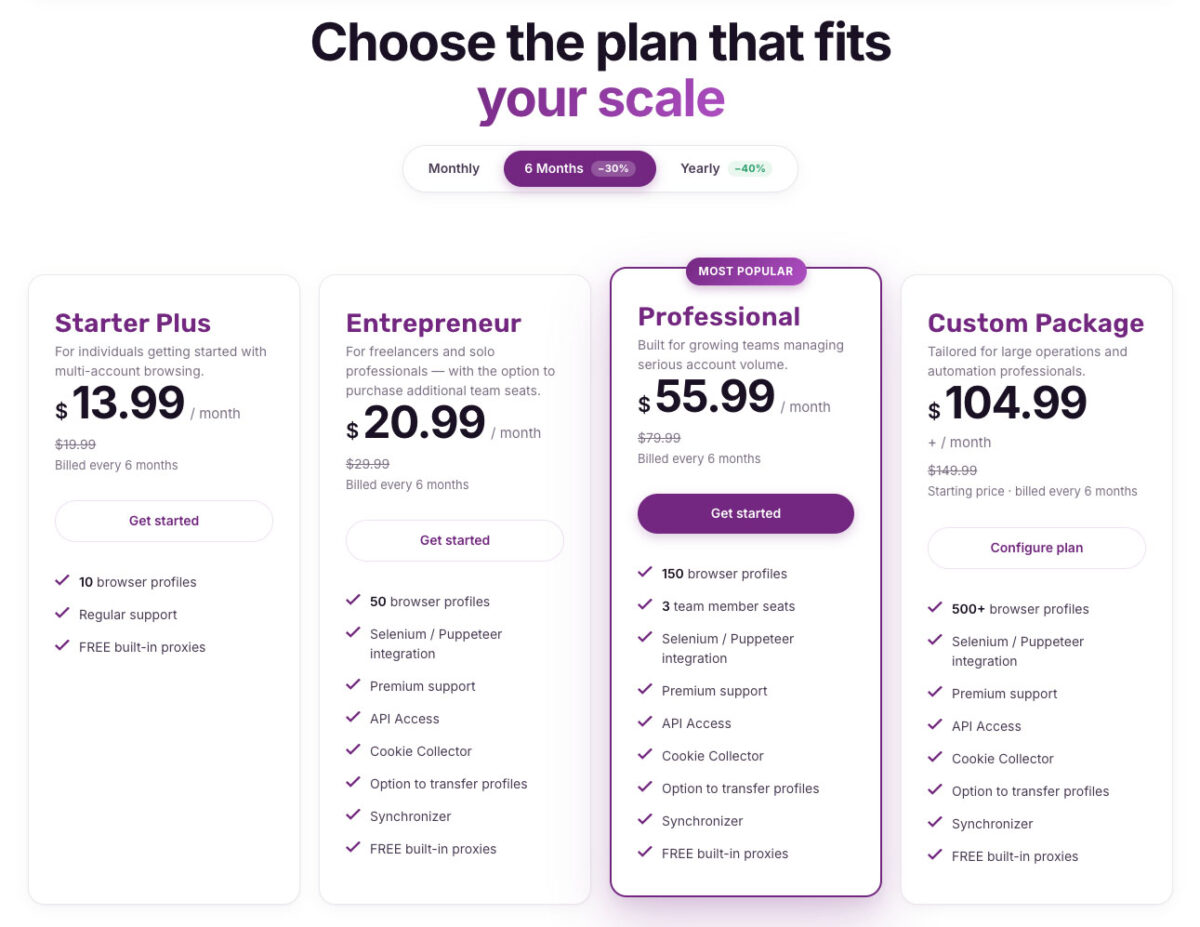
Incogniton Pricing (verified late July 2026)
Pricing (verified late July 2026)
| Plan | Price | Profiles | Notes |
|---|---|---|---|
| Free (Starter) | $0 | 10 for 2 months → 3 | No automation API, no teamwork |
| Starter Plus | $19.99/mo | 10 | Basic; no automation API |
| Entrepreneur | $29.99/mo | 50 | Unlocks Selenium/Puppeteer/API; most popular |
| Professional | $79.99/mo | 150 | 3 team seats |
| Custom | from $149.99/mo | 500–5,000 | Up to 25 seats |
Two cost notes that matter. First, 6-month or annual billing saves ~30%. Second, and easy to miss: listed prices exclude 20% VAT for EU customers, so an EU buyer’s Entrepreneur plan is closer to $36/mo, not $29.99 — factor that in. There’s also no money-back guarantee, which is partly why the free trial exists.
Pros and cons
Pros
- Easiest on-ramp — beginner-friendly, running in ~10 minutes
- Strong, well-documented automation (Selenium/Puppeteer/REST API)
- Useful extras: Paste as Human Typing, Synchronizer, bulk CSV creation
- 2-month, 10-profile free trial for real evaluation
- Reasonable mid-tier pricing for solo operators
Cons
- Free tier now time-limited (10 → 3 after 2 months)
- +20% VAT for EU buyers, not shown in listed prices
- Automation API locked below the Entrepreneur tier
- Fingerprints competent but not class-leading
- No money-back guarantee on paid plans
Security and trust
Incogniton is an established tool with a large user base and no headline breach history of the kind that hit some rivals. Standard hygiene applies: enable an authenticator app and keep irreplaceable secrets out of any single profile.
How Incogniton compares
- vs GoLogin: Both are approachable value-tier tools. GoLogin has a simpler forever-free plan (3 profiles) and bundles residential proxies on paid plans; Incogniton offers a longer 2-month/10-profile trial and stronger documented automation. Bundled proxies & simplest start → GoLogin; automation & learning runway → Incogniton. (See our GoLogin review.)
- vs AdsPower: AdsPower has deeper team features, two engines, and no-code RPA; Incogniton is friendlier for solo/technical users and gentler to learn. Teams/automation-at-scale → AdsPower; easiest solo/dev start → Incogniton. (See our AdsPower review.)
- For the full field, see our best antidetect browsers in 2026 comparison.
FAQ
Is Incogniton free? It has a free plan, but it’s now time-limited: 10 profiles for the first 2 months, then it drops to 3 profiles. To keep 10+ you need a paid plan. It’s no longer “10 free forever.”
How much does Incogniton cost? Paid plans are Starter Plus $19.99/mo (10 profiles), Entrepreneur $29.99/mo (50, most popular, unlocks automation), Professional $79.99/mo (150, 3 seats), and Custom from $149.99/mo (500+). Annual billing saves ~30%; EU buyers add 20% VAT.
Is Incogniton good for beginners? Yes — it’s arguably the easiest antidetect browser to learn, with a guided interface and a 2-month free trial to test on. Beginners consistently rate it as one of the friendliest starting points.
Does Incogniton support automation? Yes — Selenium, Puppeteer, and a REST API, well-documented, plus bulk CSV profile creation. Note automation is available from the Entrepreneur tier up, not on free or Starter Plus.
Is Incogniton safe? Yes for ordinary multi-accounting — it’s a mature tool with no major breach history. Use 2FA and don’t store irreplaceable secrets in a profile.
Do I need proxies with Incogniton? Yes. Incogniton manages the fingerprint; you assign a proxy per profile for the IP. See our proxies guide.
Bottom line
Incogniton remains the friendliest on-ramp to multi-accounting — easy to learn, strong on automation, and with a 2-month, 10-profile trial that gives real room to test. Just know the free plan is now a trial that drops to 3 profiles, and EU buyers pay 20% VAT on top of listed prices. Fingerprints are competent rather than elite, so as accounts get more valuable you may outgrow it — but for beginners and developers, it’s one of the smoothest places to start. When you’re ready to compare the field, see our best antidetect browsers guide, and pair whatever you choose with quality proxies.
Written for WarmRig — tested tools and infrastructure for traffic arbitrage and performance marketing. Independent, not sponsored.
Product Review
Thank you
Your Review is appreciated